Choosing a vlog camera in 2026 depends more on your shooting style than headline specifications. Walking creators need stabilization, while studio creators benefit from lens flexibility and larger sensors. U.S. availability also matters because several popular models remain difficult to buy domestically.
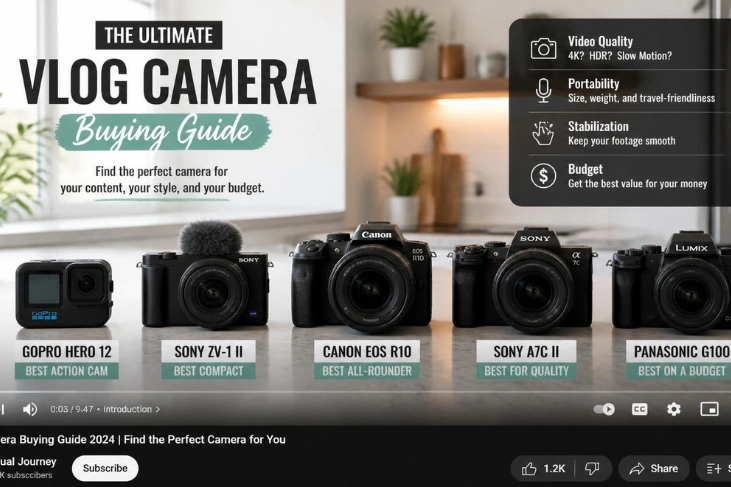
The strongest choices now range from compact fixed-lens models to pocket gimbal systems. Each format solves different problems involving weight, audio, movement, and image quality. This guide compares five practical options that U.S. creators can consider today. For more device coverage, Techanta’s Gadgets and Apps covers tools that can complement a creator setup.
| Model | Format | Key video feature | Stabilization | U.S. price signal* | Best fit |
| Canon PowerShot V1 | Fixed-lens compact | 4K30, cropped 4K60 | Optical + digital | $849 Canon sale price | Most solo creators |
| Sony ZV-E10 II | APS-C mirrorless | 10-bit 4K60 | Electronic/lens dependent | $1,099.99 kit MSRP | Lens flexibility |
| Insta360 Luna Pro | Pocket gimbal | 8K30, 4K120, vertical 4K30 | 3-axis gimbal | $599.99 | Walking and vertical content |
| Canon EOS R50 V | APS-C mirrorless | Oversampled 4K30, cropped 4K60 | Lens/digital options | $649.99 body MSRP | Beginners who want growth |
| DJI Osmo Pocket 3 | Pocket gimbal | 4K120 slow motion | 3-axis gimbal | $439 listed | Travel and quick shooting |
*Prices and stock can change. Figures reflect manufacturer information checked in September 2026.
For most U.S. creators, the Canon PowerShot V1 offers the strongest balance of portability, autofocus, audio connections, stabilization, and recording flexibility. The Insta360 Luna Pro suits creators who prioritize walking footage and vertical video. The Sony ZV-E10 II makes more sense when interchangeable lenses matter.
Five strong options for U.S. creators in 2026

A useful vlog camera buying guide should match equipment to real shooting situations. Resolution alone will not fix weak audio, shaky walking footage, or awkward framing. These five models cover different creator workflows without assuming everyone needs the same setup.
1. Canon PowerShot V1: our recommendation for most creators
The Canon PowerShot V1 combines a 1.4-type sensor with a built-in wide zoom. Its video lens range is approximately 17–52mm in full-frame terms. Canon also provides optical stabilization, Dual Pixel autofocus, and an internal cooling fan.
Its advantages include strong autofocus, useful framing choices, and dedicated microphone and headphone ports. The fixed lens keeps the setup simpler than an interchangeable system. Its main limitation is the crop applied when recording 4K at 60 fps.
This option makes sense for travel, desk videos, product content, and handheld talking shots. You avoid buying lenses before you know which focal lengths you prefer. Canon’s U.S. store also provides a clearer domestic purchase path than some competing pocket systems.
2. Sony ZV-E10 II: strongest choice for lens flexibility
The Sony ZV-E10 II uses an APS-C sensor and interchangeable E-mount lenses. It records internally in 10-bit 4:2:2 and supports 4K at 60 fps. Sony also includes creator-focused autofocus, Cinematic Vlog settings, and a directional built-in microphone.
Its main advantage is the flexibility it offers as your channel develops. You can start with a compact zoom and add wider or faster glass later. External audio connections and USB streaming also suit creators working from a desk.
The tradeoff appears when you film yourself while walking. Lens choice and electronic stabilization become more important than with a mechanical gimbal system. The complete setup can also become larger once you add glass and audio equipment.
3. Insta360 Luna Pro: strongest pocket option for vertical creators
The Insta360 Luna Pro arrived in the U.S. market in September 2026. It uses a 1-inch sensor and supports 8K30 plus 4K120 recording. Its standout feature is native 4K30 vertical recording for short-form content.
A three-axis gimbal handles motion without requiring a separate stabilizer. Subject tracking and the detachable screen also help solo creators stay framed. Insta360 currently lists the standard Luna Pro bundle at $599.99.
This model suits creators who move frequently while filming themselves. It is less appealing for people who want interchangeable lenses or serious still photography. Digital zoom also gives you less flexibility than changing physical lenses.
4. Canon EOS R50 V: a sensible beginner mirrorless option
The EOS R50 V was designed around video rather than traditional photography controls. It uses a 24.2-megapixel APS-C sensor with Dual Pixel CMOS AF II. Full-width 4K30 is oversampled from 6K, while 4K60 uses a cropped area.
Canon Log 3 and 10-bit recording offer more flexibility for advanced editing later. The body also supports vertical recording and includes a vertical tripod socket. Canon announced a $649.99 U.S. body price, with a powered-zoom kit costing more.
This is a practical starting point for creators who expect their skills to grow. You gain interchangeable lenses without starting with a high-end professional body. Budget for a suitable wide lens, because the body alone doesn’t complete the setup.
5. DJI Osmo Pocket 3: Excellent value when you can find stock
The DJI Osmo Pocket 3 remains an appealing small-format option despite its age. It combines a 1-inch sensor with three-axis mechanical stabilization and ActiveTrack 6.0. DJI also supports 10-bit D-Log M and 4K120 recording in slow-motion mode.
The device works especially well for travel and walking footage. Its rotating screen switches quickly between horizontal and vertical shooting. Direct wireless microphone support also reduces the amount of equipment you need.
U.S. availability is the main concern in September 2026. DJI lists the base model at $439, but its direct U.S. store currently shows it out of stock. Buyers should compare legitimate retailer stock before paying higher marketplace prices.
How to choose a vlog camera without overspending
Start by identifying the hardest shot you record most often. A walking travel creator needs stabilization more than interchangeable lenses. A studio reviewer may value lens choices, audio monitoring, and long recording sessions instead.
A front-facing screen remains useful when you work alone. Reliable face autofocus reduces ruined takes caused by missed focus. Good audio support often improves perceived production quality more than moving from 4K to 8K.
Think about total system cost rather than the body price. Mirrorless setups may require a lens, microphone, tripod, batteries, and memory cards. Compact and gimbal models can reduce those extra purchases.
Your editing computer also affects the decision. High-resolution and 10-bit files consume more storage and processing power. Recording features have little value if your workflow makes every upload difficult.
What U.S. buyers should know about DJI Availability
The U.S. market deserves separate consideration during 2026. DJI’s Pocket 4 generation is available in other regions but isn’t officially available in the U.S. That makes international reviews less useful for American shoppers.
The older Pocket 3 remains listed on DJI’s U.S. store. Direct inventory was unavailable during this research, despite the $439 listed price. Insta360’s Luna Pro provides a newer domestically available alternative at $599.99.
Don’t choose imported gear based only on specifications. Warranty service, returns, accessories, and replacement availability can affect long-term ownership. A slightly less exciting model may create fewer problems during paid or time-sensitive work.
Do You Need Dedicated Gear if Your Phone Already Shoots 4K?
A recent flagship phone can be enough for many new creators. Keep using it until you can identify a limitation that affects your videos. Common reasons to upgrade include low-light quality, audio connections, stabilization, lens control, or long recording sessions.
Spending money without solving a specific problem rarely improves a channel. Better lighting and clearer audio may improve your videos more. A dedicated device becomes worthwhile when it removes friction from your regular workflow.
Comparing the whole workflow, including lighting, audio, and editing, prevents one expensive purchase from consuming your entire budget.
Build a Better Creator Workflow Around Your Gear
Recording is only one part of publishing consistently. Editing, file management, scheduling, and distribution can consume more time than filming. Techanta’s digital tools guide covers useful tools for content creation and productivity.
Distribution also deserves planning before you record. Horizontal YouTube videos and vertical social clips may need different framing choices. Techanta’s guide to social media optimization explains how content distribution supports reach and engagement.
A simple workflow usually beats a complicated equipment collection. Pick gear that reduces setup time and makes repeated publishing easier. Equipment that stays at home contributes nothing to the next upload.
Final Recommendation
The right vlog camera should make recording easier, not add unnecessary setup. For most U.S. creators, the Canon PowerShot V1 offers the most balanced package here. Its wide zoom, audio connections, autofocus, stabilization, and cooling suit several content styles.
Choose the Luna Pro when stabilized walking footage and vertical publishing dominate your work. Choose the ZV-E10 II or R50 V when lens flexibility matters more than pocketability. Check current U.S. stock and pricing before buying because availability can change quickly.
Frequently Asked Questions
What is the best vlog camera for beginners?
The Canon EOS R50 V is a strong starting point for creators who want interchangeable lenses. Its autofocus and video-focused interface reduce the learning barrier. The PowerShot V1 is simpler if you prefer a fixed-lens setup.
Is 4K necessary for vlogging in 2026?
You can still publish useful content in 1080p. Recording in 4K gives you more room to crop and reframe. Strong lighting, clear audio, and steady framing still matter more than chasing 8K.
What do most vloggers need from their equipment?
Solo creators benefit from dependable autofocus, easy self-framing, stable footage, and clean sound. Battery life and simple file transfers also matter when you publish often. Advanced codecs become useful when you start doing heavier color work.
Should I choose a compact model or a mirrorless body?
Choose a compact option when portability and quick setup matter most. Pick mirrorless when you want interchangeable lenses and more control over image style. Your regular shooting environment should decide which compromise makes sense.