
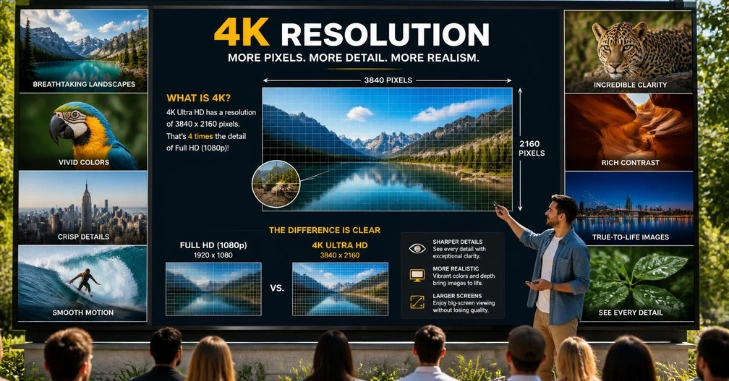
If you are asking what is 4K resolution is, the short answer is 3840 × 2160 pixels for consumer displays. That works out to about 8.3 million individual pixels on one screen. Those extra pixels can create finer detail than Full HD on suitable content and displays.
Direct answer: 4K usually means a 3840 × 2160-pixel image on consumer TVs and monitors. That equals about 8.3 million pixels, or four times the pixels in 1080p. Cinema 4K uses 4096 × 2160 instead. Extra pixels can make fine details clearer on larger screens.
| 4K fact | What it means |
| Consumer resolution | 3840 × 2160 pixels |
| Total pixels | About 8.3 million |
| Other common name | Ultra HD or UHD |
| Vertical resolution | 2160 pixels |
| Typical aspect ratio | 16:9 |
| Cinema standard | 4096 × 2160 pixels |
| Compared with 1080p | Four times as many total pixels |
| Common uses | TVs, monitors, streaming, gaming, cameras |
The Consumer Technology Association defines consumer 4K Ultra HD displays as having a minimum resolution of 3840 × 2160. Digital Cinema Initiatives uses the wider 4096 × 2160 format for professional cinema systems. These standards explain why two different pixel dimensions can both carry the 4K label.
Key Takeaways
- Consumer 4K normally means 3840 × 2160 pixels.
- 4K UHD contains about 8.3 million pixels.
- It has four times the total pixel count of 1080p.
- Cinema 4K usually uses 4096 × 2160 pixels instead.
- Resolution alone does not determine picture quality.
- Screen size, viewing distance, HDR, source quality, and refresh rate also matter.
- 4K places greater demands on internet bandwidth, graphics hardware, and storage.
What Is 4K Resolution in Simple Terms?
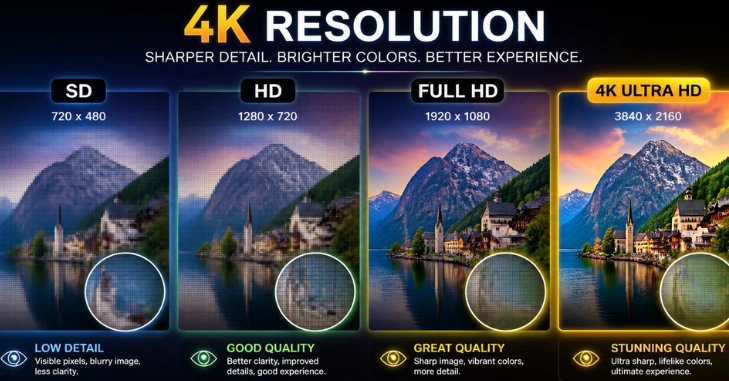
What Is 4K Resolution? A digital screen builds every image from tiny colored points called pixels. A 3840 × 2160 display has 3,840 pixel columns and 2,160 pixel rows. Multiplying those numbers gives 8,294,400 pixels across the complete image.
More pixels allow a display to show smaller details without making individual pixels as noticeable. The difference becomes easier to see on larger screens or from shorter viewing distances. Source quality must also contain enough detail for the display to show.
Why Is It Called 4K?
The name comes from the image width, which is close to 4,000 pixels. This differs from names such as 1080p, which use the vertical pixel count. Consumer UHD falls slightly short of 4,000 horizontal pixels at 3,840.
The letter “K” represents roughly one thousand in this naming system. Therefore, 4K describes an image with approximately four thousand horizontal pixels. The same consumer format is also called 2160p because it has 2,160 vertical pixels.
Is 4K the Same as UHD and 2160p?
For most American TVs, monitors, streaming services, and game consoles, the terms usually point to 3840 × 2160. Manufacturers commonly label that resolution 4K, 4K UHD, Ultra HD, or 2160p. You can normally treat those terms as equivalent while shopping for consumer equipment.
Professional cinema uses a slightly different standard at 4096 × 2160. That format is wider than consumer UHD and follows Digital Cinema Initiatives specifications. The distinction matters mainly for professional filmmaking, cinema projection, and certain editing workflows.
How Does 4K Compare With 1080p, 1440p, and 8K?
| Resolution | Pixel dimensions | Approximate pixels | Common use |
| 1080p Full HD | 1920 × 1080 | 2.1 million | TVs, laptops, gaming |
| 1440p QHD | 2560 × 1440 | 3.7 million | PC monitors, gaming |
| 4K UHD | 3840 × 2160 | 8.3 million | TVs, monitors, video |
| 8K UHD | 7680 × 4320 | 33.2 million | Premium large-screen TVs |
A 4K image has twice the width and twice the height of 1080p. Doubling both dimensions produces four times as many total pixels. That added pixel density can preserve more detail across a large display.
Moving from 4K to 8K repeats that process. An 8K frame contains four times the pixel count of 4K UHD. The visible benefit depends heavily on screen size, viewing distance, and the quality of the native content.
Does 4K Always Look Better Than 1080p?
Higher resolution lets a screen display more detail. It cannot create detail that is missing from the original video, game, or image. Poor compression or low-quality source footage can still look disappointing on a high-resolution screen.
Screen quality also involves brightness, color accuracy, contrast, panel technology, and processing. A strong 1080p display can sometimes look more pleasing than a weak 4K model. Resolution should therefore be treated as one part of picture quality.
Physical layers over a screen can also influence perceived clarity and brightness. Techanta explains these factors further in its guide to how screen protectors affect display quality. That distinction matters because visible sharpness depends on more than the panel’s pixel count.
What Does 4K Change on a TV?
The extra detail becomes useful as television sizes increase. Larger screens spread pixels across more physical space, making lower resolutions easier to notice up close. A 4K panel keeps pixel structure finer than 1080p at the same screen size.
Movies, sports, documentaries, and high-quality streaming can benefit when native UHD content is available. Upscaling can improve lower-resolution material, but it does not create true native detail. Your viewing distance also affects how easily you can see the difference.
What Does 4K Change on a Computer Monitor?
A high-resolution monitor can make text, photographs, and interface elements look sharper. It also provides a larger pixel workspace for editing photos or high-resolution video. Operating-system scaling is often used to keep text comfortable to read.
Screen size should still guide your buying decision. Techanta’s tablet buying guide and display considerations explain why you should consider resolution alongside screen size. The same principle applies when comparing desktop monitors and laptop displays.
Is 4K Good for Gaming?
4K gaming can produce detailed environments, sharper edges, and clearer distant objects. The tradeoff is the amount of graphics processing required for every frame. Rendering 8.3 million pixels is much harder than rendering a 1080p frame.
Frame rate may matter more than maximum resolution for competitive players. A gamer may prefer 1440p at a higher refresh rate over 4K at a lower rate. Your graphics card, console, monitor, and chosen games should guide that decision.
What Do You Need for 4K Streaming?
You need compatible content, a suitable display, and enough connection speed for stable playback. Netflix currently recommends at least 15 Mbps for Ultra HD streaming. Your plan, device, application, and playback settings must also support UHD.
YouTube identifies 3840 × 2160 as its standard 2160p 4K resolution for 16:9 video. It also recommends recording and exporting at that resolution when producing 4K content. Lower-quality uploads cannot gain genuine native detail merely because playback uses a high-resolution screen.
Before troubleshooting playback, check these parts of the chain.
- A 4K-capable television or monitor
- Native 4K content
- A streaming plan that includes UHD where required
- Sufficient internet speed
- A compatible streaming device, computer, or console
- Suitable HDMI or DisplayPort connections where needed
- Correct display and application settings
A problem anywhere in that chain may reduce playback quality. Some services automatically lower resolution when bandwidth drops. Others restrict UHD playback to supported devices, browsers, plans, or connection standards.
Is 4K the Same as HDR?
4K describes resolution, while HDR describes brightness, contrast, and color capabilities. A television can support 4K without offering strong HDR performance. An HDR label also doesn’t tell you how many pixels a display has.
This distinction helps when comparing specifications in a store. Resolution tells you how finely the image can be drawn. HDR and panel performance affect how bright, dark, and colorful that image can appear.
Is 4K Worth It for Most People?
For modern large-screen televisions, 4K is a practical choice because UHD models are now widely available. It makes the most sense if you regularly watch high-resolution movies, shows, games, or videos. The benefit also grows when you sit close enough to notice additional detail.
For computer users, the answer depends more on monitor size and workload. Video editors, photographers, and productivity users may value the added desktop detail. Competitive gamers may instead prioritize refresh rate and graphics performance.
Techanta readers comparing devices can browse the site’s Gadgets and Apps section for related technology guides. Developers working across different screen sizes can also read Techanta’s responsive display and Flutter guide. Both resources provide useful context for how displays and screen dimensions affect technology choices.
The Bottom Line on 4K
Consumer 4K usually means 3840 × 2160 pixels, delivering about 8.3 million pixels per frame. It provides four times the pixel count of Full HD but doesn’t guarantee better picture quality on its own. Native content, display quality, viewing distance, HDR, and refresh rate still affect what you see.
What Is 4K Resolution? For TVs, larger monitors, gaming, video production, and streaming, UHD can provide a clear visual advantage. Still match the resolution to your screen size and hardware. Check Techanta’s technology guides before choosing your next display or connected device.
Frequently Asked Questions
What is 4K resolution on a TV?
On a consumer television, 4K resolution usually means a screen containing 3840 × 2160 pixels. That equals around 8.3 million pixels across the full display. The format is commonly marketed as 4K UHD, Ultra HD, or 2160p.
Is 4K four times better than 1080p?
4K contains four times as many total pixels as 1080p. That does not mean every image automatically looks four times better. Viewing distance, source quality, screen size, compression, HDR, and display quality affect how much difference you see.
Is 2160p considered 4K?
Consumer 3840 × 2160 video is commonly described as both 2160p and 4K UHD. The term 2160p refers to the image’s 2,160 vertical pixels. The 4K name instead refers to its roughly 4,000 horizontal pixels.
Can a 1080p video become true 4K on a 4K TV?
A 4K television can upscale 1080p content to fill its native pixel grid. Upscaling estimates additional pixel information and can make the image appear smoother. It cannot restore original detail that was never captured in the 1080p source.
Do I need 4K for a small screen?
A smaller screen makes differences between resolutions harder to notice at normal viewing distances. Higher pixel density can still improve text and fine details up close—your viewing distance and how you use the device matter more than the resolution label alone.
S